How to connect to eduroam on Linux/Ubuntu
1. Select the menu bar in the top right (where the sound and battery icon show), then click the Wi-Fi icon, then click Select Network.
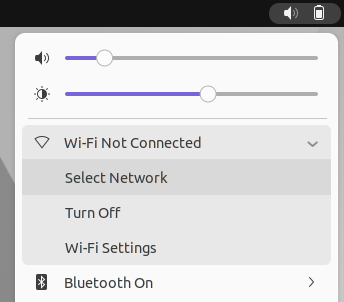
2. Select eduroam from the list of available networks.
3. In the Wi-Fi authentication window, enter the following:
- Wi-Fi security: WPA & WPA2 Enterprise
- Authentication: Protected EAP (PEAP)
- Anonymous identity: Leave blank
- Domain: Leave blank
- CA Certificate: None
- Tick No CA certificate required
- PEAP version: Automatic
- Inner authentication: MSCHAPv2
- Username: Enter your Keele email address
- Password: Enter your Keele IT password
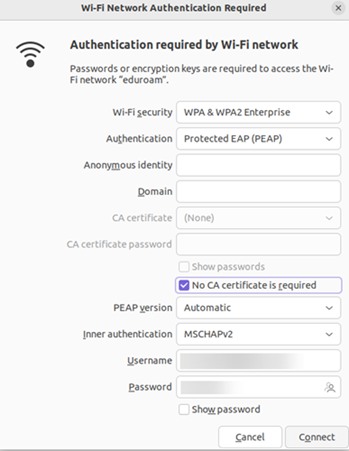
4. Tap Connect. If you are prompted about a certificate, click Ignore.
You should now be connected to eduroam.