Adding meta data to pages
To ensure that the Keele website ranks highly on search engines, metadata must be added for every page that you create.
Each page (section) within the CMS has metadata fields:
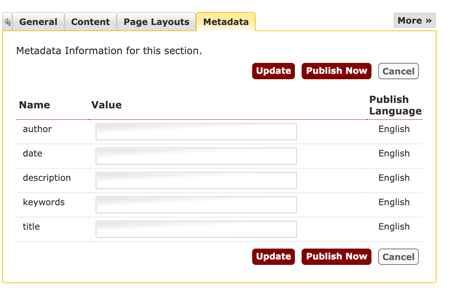
The text inputted into these fields will be displayed on Google search results.
Where meta data is used
- author - this field is not required. If it is filled in on a section that contains a 'k- News item' (or other fulltext templates), it will be included in the published page. Useful if you need to attribute the article to a specific person rather than just 'Keele University'.
- date - this field is not required. If it is filled in on a section that contains a news story (or other fulltext templates), it will be included in the published page. Only useful if you'd like to include a date in your meta data. Please note that the 'k- Events' content type outputs the date automatically. Date format should follow the ISO standard e.g. 2021-03-25.
- description - optional but recommended field. More details below.
- keywords - on occassion we may use keywords internally for e.g. search, however keywords are ineffective at increasing your SEO score and so we do not recommend that you fill this in.
- title - optional field. This can be useful when e.g. you have multiple pages with the same section name. Adding a more descriptive title here can help search engines display a more verbose and relevant title. We do not recommend adding titles unless you have a specific use case.
A specific case would be e.g. an undergraduate web page - instead of having the default section title 'History', we use the meta title to populate it with 'History | BSc Hons'.
Meta titles
Meta titles are critical to giving users a quick insight into the content of a result and why it's relevant to their query.
It's often the primary piece of information used to decide which result to click on, so it's important to use high-quality titles on your web pages.
The recommended length of titles is 35-60 characters. Avoid too short and too long or verbose titles, which are likely to get truncated when they show up in the search results.
Meta descriptions
Ensure that each of your web pages have a unique meta description that is explicit and contains your most important keywords for each page.
A meta description tag should generally inform and interest users with a short, relevant summary of what a particular page is about.
This is like a pitch that convinces users that the page is exactly what they're looking for.
Google generally truncates snippets to around 155–160 characters.
It's best to keep meta descriptions long enough that they're sufficiently descriptive, so we recommend descriptions between 50–160 characters.