Pasting content into the CMS
It is important to remove formatting when pasting content into the CMS.
If you would like to paste content into the CMS (e.g. from Microsoft Word), it is important to remove the content's formatting first.
We do this because text copied from Word (or other rich text documents) contains formatting that can wreak havoc on your web page. And once it happens it’s hard to undo.
One of the drawbacks is that the formatting of titles, text, and hyperlinks will need to be readded afterwards - but it is still an important process to follow.
How to remove text formatting
Option one - use Notepad
Paste the text into a plain text document (use Windows Notepad or Mac TextEdit formatted as plain text), and then copy the text back out and into the CMS.
Option two - paste and match style
On Mac, select 'Edit', 'Paste and Match Style' on Chrome or use the keyboard shortcut Option + Shift + Command + V.
On Windows, you can use the combination Ctrl + Shift + V to paste without formatting.
Option three - use the 'Paste as Plain Text' shortcut on T4
At the top of your content block, use the 'Paste as Plain Text' icon. This will paste the text and remove the formatting for you.
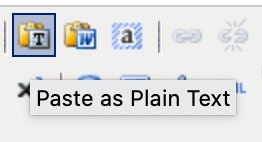
Option four - use 'Paste from Word' option in T4
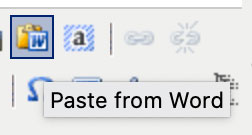
Next to the 'Paste as Plain Text' icon in T4 you can find 'Paste from Word' button:
It opens up a new windows for you to paste the content into and insert after:
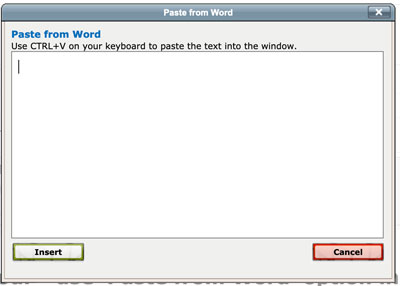
This is meant to remove the MS Word code. The benefit of this method is that it allows you to save some formatting (links, bulletpoints for example) from your copy. However, it is not 100% reliable and very often it does not work, allowing the <div> and <span> tags to creep in and destroy the layout of your page. If it does not work correctly, it can make your page very heavy with code as well. If you are confident with HTML, you can check the code to see if that worked for you within HTML option and accessing HTML Source Editor.
We advise using this 'Paste from Word' option with caution.
We have added an extra feature that notifies you about the presence of malignant code. If your pasted text turns red and with a strikethrough like this (in CMS editor as well as in the preview):

It means that some unpleasant code tagged along and needs cleaning up. Please re-paste your content by using options 1-3 if you see that.